MeshHound /
Household & Decor / Designing a Parametric "Print in Place" Hinged Container Using Autodesk Fusion 360
Household & Decor
Designing a Parametric "Print in Place" Hinged Container Using Autodesk Fusion 360
by Greg Zumwalt
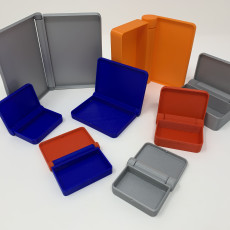
The eight different size and color 3D printed "print in place" hinged containers appearing in the cover photograph of this tutorial do have one thing in common; they were all printed from a single Autodesk Fusion 360 model using "parametric modeling". In a CAD environment, a parametric model is a m
View on myminifactory →Details
Sourcemyminifactory
CategoryHousehold & Decor
File formatsF3D, STL
PriceFree
Licenceshare, attribute, mention, remix
Est. difficultyIntermediate
Also on 2 other sites
MeshHound matched this design across multiple platforms. Compare licence and price before you download — they often differ between listings.
Tags
containerparametricultimakerprintinplaceautodeskFusion360HingedContainer
Find more like this
Browse every Household & Decor model MeshHound has indexed, or search across all sources at once.
Indexed by MeshHound — search 3D models across every major source. This page links to the original; the model is hosted by myminifactory, and all rights remain with its creator.